
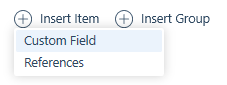
When inserting a compliance item and choosing a Custom Field you are presented with a drop-down list of all of the existing applicant Custom Fields. As many custom fields as needed can be inserted to create the compliance requirement. The coloured ellipses denote the data type of that Custom Field.
See the article Data | Custom Fields on how to create them.
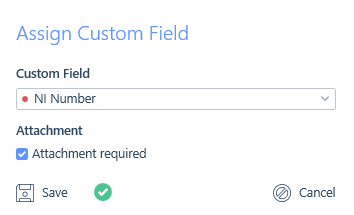
For all Custom Fields, there is an option to set an attachment as a requirement to satisfying that Custom Field.
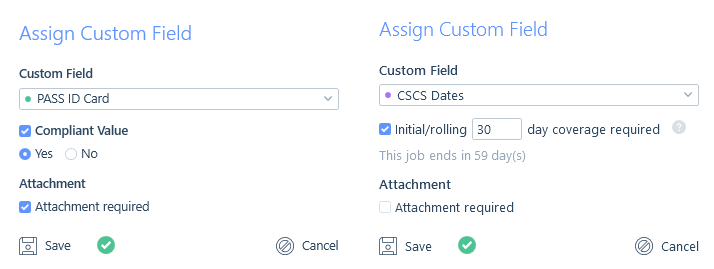
Additionally, for Boolean and Date Range Custom Fields you will have additional options to determine what will make that Custom Field compliant.
Boolean Custom Fields
Because Boolean Custom Fields have a true and false value you will be able to select which one is the compliant value. Leaving the compliant value unchecked will mean that as long as the Custom Field is applied to the applicant’s record they will be deemed compliant (dependant on the attachment setting).
Date Range Custom Fields
Using Date Range Custom Fields in compliance allows you to track compliance items that have an expiry date.
The additional option on the Date Range Custom Field is called “Initial/rolling X day coverage required”. This allows you to set the number of days before the applicant’s Custom Field end date that the applicant will show as non-compliant. This essentially works as a means of a ‘warning light’ to show the applicant’s compliance is about to run out (think of it a bit like a petrol warning light, letting you know when you are low on petrol before the tank is empty).
Leaving this additional option unchecked will mean that as long as the Custom Field is applied to the applicant’s record they will be deemed compliant (dependant on the attachment setting).
Once ticked you can set this number to the minimum number of days remaining you deem an applicant needs on the custom field to be compliant, which is likely based on a reasonable amount of time for this to be renewed or a new one obtained.
If the applicant has fewer days remaining on the custom field than the number required and you have compliance warnings set as Informational within the IMU (please see the Settings | General Settings article), you will be warned through the whole submission process, including placements as well as extensions and in the Compliance Management area, please see the Compliance Management article.
Alternatively, if the applicant has fewer days remaining on the custom field than the number required and your compliance warning is set as Preventative, you will be warned through the submission process but you will not be able to place or extend the applicant. Post Placement, if the number of days remaining on the Date Range Custom Field becomes less than the minimum number required then the placement will become non-compliant and also display in the Compliance Management area, please see the Compliance Management article.
The behaviour of this additional option does vary however, depending on the charge type (interval or fixed fee):
- For interval charge placements compliance is also tracked throughout the entire placement (including any extensions).
- For fixed-fee placements, compliance will only be checked for the first x days of the placement as it would be the new employer’s responsibility to ensure the applicant remains compliant in the future.
- Once the job/placement end date is in the past, compliance will be deemed as satisfied as there are 0 placement days left that need to be covered by the compliance.
Here is some additional information regarding start dates:
If the current date is before the job/placement start date the “Initial/rolling X day coverage required” refers to the number of days following the job/placement start date (as they are the rolling/next x days of the placement)
- For example, if today is the 1st of March and the job/placement starts on the 1st of April and this is set to 30 days, we start the count of days from the 1st of April.
If the current date is on or after the job/placement start date then it is the rolling/next x number of days from today’s date that is checked.
- For example, if today is the 1st of March and the job/placement started on the 1st of February and this is set to 30 days, we start the count of days from the 1st of March.