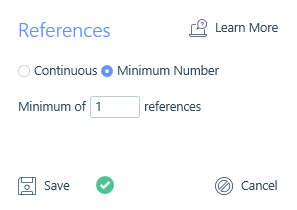
When inserting a compliance item and choosing References you can either choose to select continuous references or a minimum number of references.
See the article References for more information on assigning these to applicant records.
Continuous References
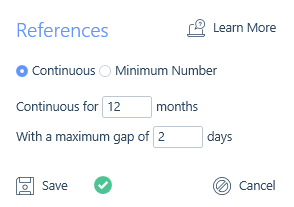
Using Continuous References allows you to ensure that applicants submitted to the job have references that cover a period of time you dictate, such as 12 months. Therefore in order for an applicant to be compliant against this setting, they would require at least one reference marked as received, held on their record within the References area, which covers 12 months.
When the template containing a reference is applied to a compliance requirement, the Up To date will be applied, this will default to todays date but can be changed. The Up To date is the date up to which the 12 months is calculated and can be a past, present or future date.
Additionally, there is a maximum gap field for continuous references which can be customised to allow for gaps between references as well prior to the Up To date. For example, 2 days could be set to allow for weekends as an applicant might leave their job at the end of a week before starting their following job the next week. Perhaps slightly longer is required due to marginally larger gaps being tolerated as well as the most recent references received date and the likely gap between it and the job/placement start date. Alternatively setting the gap to 0 would result in no gaps being allowed.
Minimum number of References
A minimum number of references might be more applicable. Therefore in order for an applicant to be compliant against this references compliance requirement, they would have to have at least the minimum number of references required recorded within their References area, and they must be marked as received.