
If you use itris 9’s email integration, you’ve probably noticed it working hard in the background, logging emails to records and flagging potential new contacts.
These two settings let you fine-tune that behaviour so it works for you rather than creating noise.
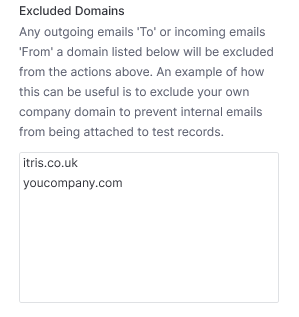
Excluded Domains
This setting lets you specify email domains that should be excluded from automatic email logging and contact detection.
Any email address belonging to a domain on this list will be ignored by the integration.
Typical Use Case
Add your own company domain here, for example @yourcompany.com.
If you or your colleagues also exist as test records (applicants, companies, contacts) in itris, internal emails could otherwise get logged against those records.
Here’s exactly what gets excluded:
Outgoing emails to — If any itris user sends an email to [email protected], that email will not record in itris.
Incoming emails from — If [email protected] sends an email to any user, that email will also not record in itris.
The Benefit
Your email history with real applicants and contacts is not affected at all.
Internal emails simply won’t appear on those test or placeholder records, keeping your data clean and your record history relevant.
Example
A recruiter at Swift Resourcing has their own profile in itris as a test record.
Without exclusion, every internal email they send gets logged against their own applicant record.
Adding @swiftresourcing.com to the Excluded Domains list stops this entirely.
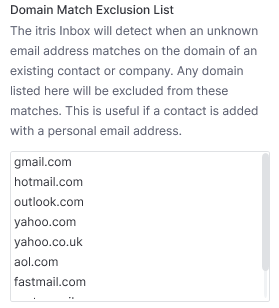
Domain Match Exclusion List
When itris 9 receives an incoming email, it looks at the domain part of the sender’s email address.
If that domain matches an existing company record in itris, it may suggest adding the sender as a new contact at that company.
This setting lets you exclude common or shared email domains from that matching process.
Typical Use Case
Many candidates and contacts use generic email providers rather than a company domain.
Common domains like @gmail.com @hotmail.com @outlook.com are added to this list by default.
Without exclusions, every person emailing you from Gmail could be incorrectly suggested as a new contact at whichever company in itris also has a Gmail address on file.
The Benefit
You get cleaner, more accurate contact suggestions.
Only emails from genuine company domains will trigger a “potential new contact” prompt, meaning less noise and fewer irrelevant suggestions to dismiss.
Example
You work with a small construction firm whose contacts use personal Gmail addresses.
Without this setting, every Gmail sender who emails you could be flagged as a potential new contact at that company.
Adding @gmail.com to the Domain Match Exclusion List removes this problem entirely.
Quick Recap
✓ Use Excluded Domains to stop internal emails being logged against your own team’s test records in itris.
✓ Use the Domain Match Exclusion List to filter out generic email providers from new contact suggestions.
✓ Neither setting affects your real applicant and contact email history - emails from candidates and clients are still logged as normal.
✓ Common providers like Gmail and Hotmail are already excluded by default - but you can add any domain that’s causing noise in your suggestions.